

Key takeaways
- Charging stops on rough roads. The cable connector is working loose, so use a locking or right-angle cable.
- Phone shows slow charging. The cable may not support PD, or the phone is hot and throttling.
- Battery dead after parking. The charger is on an always-live circuit, so add a switch.
- Corroded plug after winter. Unsealed connectors collect road salt and water.
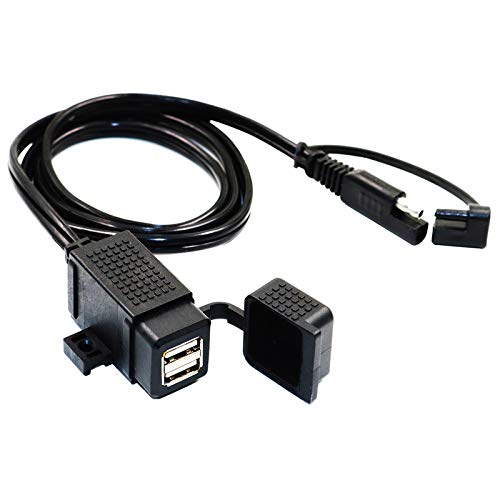
The best motorcycle USB charger for most riders is a wired handlebar unit with a USB-C Power Delivery port of at least 20 to 30 watts, a 10 amp inline fuse and a waterproof connector, with EXTRACTME, YONHAN and Nilight models appearing most often in 2026 roundups. Wireless mounts like the BRCOVAN are convenient but add heat and vibration risk to the phone. The most important decision is not the brand but whether the charger matches your handlebar diameter, your bike’s battery wiring and your phone’s charging needs.
Our top picks


As an Amazon Associate we earn from qualifying purchases at no extra cost to you.
Charger Comparison
| Pick | Type | Output | Mounting | Best for |
|---|---|---|---|---|
| EXTRACTME dual-port | Wired, SAE connection | 20W USB-C PD plus 18W USB-A QC3.0 | Handlebar clamp | Best overall |
| OTOOKAYA slim | Wired, SAE | 30W USB-C PD plus 18W QC3.0 | 0.51 inch wide clamp | Tight cockpits |
| YONHAN | Wired, SAE | 60W total: 30W PD plus 30W QC3.0 | Handlebar, fixed or screws | Power users |
| Nilight | Wired | Dual port with voltmeter | 7/8 inch handlebar | Warranty-minded buyers |
| KAEDEAR dual USB-C | Wired, SAE | Two 30W PD ports | Handlebar clamp | Phone plus intercom or GPS |
| BRCOVAN charging mount | Mount with Qi | 15W wireless plus USB-C, IP66 | Handlebar mount with vibration damper | Navigation |
| Kewig mount | Mount with Qi | 15W wireless plus USB-C | Handlebar | Budget |
Output figures are as listed by the makers and roundups; different sources report some models slightly differently, so confirm on the product page.
Best Overall: EXTRACTME Dual-Port Charger
Reviewers repeatedly choose EXTRACTME for its combination of a USB-C PD port and a USB-A Quick Charge port, built-in voltmeter and weather-sealed housing. It lets you charge a phone and a second device, such as a Bluetooth headset, at the same time. The caveat is that it needs a wiring connection to the battery or an accessory lead, which means a short install.
Best Slim Design: OTOOKAYA
At about half an inch wide, this charger fits among crowded handlebar controls. It offers 30 watts on the USB-C port, enough to maintain charge while running navigation. The slimness means a smaller port area and fewer extra features.
Best for Power: YONHAN 60W
With 30 watts on each of its two ports, the YONHAN can run a phone and a tablet or GPS together. It also has an on/off switch so you can disconnect it when parked, which helps protect the battery. Higher output draws more current, so check your bike’s electrical capacity.
Best Warranty: Nilight
Nilight comes with a 7/8 inch bar mount, a voltmeter and an inline 10 amp fuse, and it is the model highlighted for its longer warranty. It is a safe pick if you want support after purchase.
Best Dual USB-C: KAEDEAR
Two 30 watt USB-C ports make this model ideal for riders whose devices all use USB-C. It is water resistant and clamps to the bar. It lacks USB-A, so older accessories need an adapter.
Best Phone Mount With Charging: BRCOVAN
The BRCOVAN pairs 15 watt Qi charging with a USB-C port and an IP66 rating, plus a vibration damper to protect the phone camera. Wireless charging adds heat, and vibration can harm some phone camera stabilizers, so many riders prefer a wired cable for long rides. Kewig makes a cheaper version with similar features.
How to Choose a Motorcycle Charger
Measure your handlebar
Many chargers fit 22.2 mm (7/8 inch) bars. Others fit 25.4 mm (1 inch). Check your bar diameter before buying.
Calculate your needs
A phone running navigation at full brightness can draw around 10 to 15 watts. A 20 watt port is enough to keep it charged. If you also charge a communicator or camera, add that power.
Check battery draw
A typical charger idles at very low current, but leaving it connected for weeks on a weak battery can drain it. Use a switch, or connect to a switched accessory circuit.
Install safely
Use a fuse within a short distance of the battery, observe polarity, and route wires away from heat and moving parts. If you are unsure, have a technician install it.
Wired vs Wireless
| Feature | Wired USB | Wireless Qi mount |
|---|---|---|
| Charging speed | 20 to 30W typical | Up to 15W |
| Heat | Low | Higher |
| Vibration risk | Cable only | Phone held in mount |
| Convenience | Plug in | Drop in |
Charging Math: How Much Power Do You Need
A simple way to size a charger is to estimate your phone’s draw and add your other devices. A phone with a 4,500 mAh battery (about 17 watt-hours) running navigation with the screen on may draw roughly 8 to 12 watts. A 20 watt port supplies more than the phone uses, so the battery slowly gains charge. On a hot day with a bright screen, the phone can draw nearly everything an older 12 watt port provides, which is why some riders arrive with the same percentage they left with. Adding a camera or communicator means you should look for at least 30 watts of total capacity.
| Setup | Estimated total draw | Suggested charger |
|---|---|---|
| Phone with navigation only | 8 to 12 W | 20 W USB-C PD port |
| Phone plus communicator | 11 to 15 W | Dual-port, 30 W total |
| Phone plus action camera | 15 to 22 W | 30 W PD plus QC3.0 port |
| Phone, GPS and tablet | 25 to 40 W | 60 W total, YONHAN class |
These are planning estimates rather than measurements; actual draw depends on screen brightness, temperature and the phone model.
Installation Steps and Why They Matter
- Disconnect the battery’s negative terminal. This prevents sparks while you work.
- Choose the power source. A switched circuit turns off with the ignition, so the charger cannot drain the battery. A direct battery lead needs its own switch.
- Mount the fuse near the power source. The fuse protects the wire if it rubs through, because the wire is what can overheat.
- Route wires away from heat and moving parts. Leave slack at the steering head so turning the bars does not tug the wire.
- Seal the connectors. Dielectric grease and a cap on the SAE plug keep water out when the charger is not in use.
- Use the voltmeter. Chargers with built-in voltmeters let you watch the battery; a reading below about 12 volts with the engine off is a warning sign.
Common Charger Problems
- Charging stops on rough roads. The cable connector is working loose, so use a locking or right-angle cable.
- Phone shows slow charging. The cable may not support PD, or the phone is hot and throttling.
- Battery dead after parking. The charger is on an always-live circuit, so add a switch.
- Corroded plug after winter. Unsealed connectors collect road salt and water.
Frequently Asked Questions
Will a charger drain my motorcycle battery?
Only if it stays powered while the bike is off for a long time. Use a switch or switched circuit to prevent that.
Is wireless charging safe on a motorcycle?
It works, but heat and vibration are concerns. A damped mount and short rides reduce the risk.
What fuse should I use?
Most chargers ship with a 10 amp inline fuse. Follow the manufacturer’s instructions for your model.
Do I need USB-C PD?
Modern phones charge faster over USB-C PD, so it is the best choice if your phone supports it.
Are they waterproof?
Many are water resistant, but a rating like IP66 gives better assurance. Seal connectors to prevent corrosion.






Write Your Review
No reviews yet. Be the first to share your experience!