

Our Short List of 3
All 4 Picks at a Glance
| Product | Specs | Action |
|---|---|---|
 1. ELEGOO Saturn 4 Ultra 16K | Check price on Amazon | |
 2. ANYCUBIC Photon Mono M7 Pro | Check price on Amazon | |
 3. phrozen Sonic Mega 8K S | Check price on Amazon | |
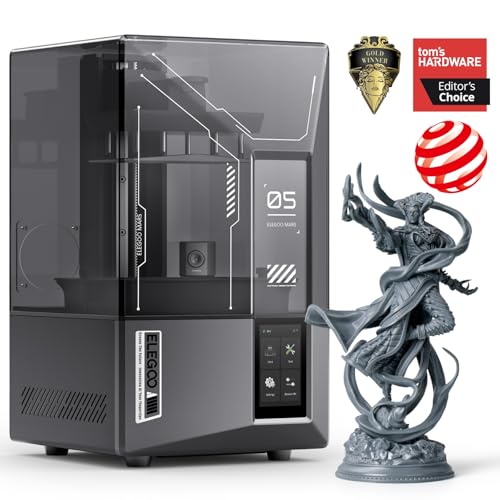 4. ELEGOO Mars 5 Ultra | Check price on Amazon |
Key takeaways
- Compare the best high-resolution resin 3D printers for prototype studios, from a 16K detail flagship to a large-format 8K machine for bigger prototype parts.
A prototype studio asks more of a resin printer than a hobby bench does. Parts have to come off the plate dimensionally true, surface detail has to survive a client presentation, and the machine has to repeat that result across a full plate of parts, day after day. Resolution marketing alone does not guarantee any of that. What matters is the combination of pixel size, build volume, light uniformity, release mechanics and the small automation features that keep a busy studio from babysitting every print.
This guide compares four high-resolution resin 3D printers that cover the main studio use cases: a 16K flagship for maximum detail on mid-size parts, a fast 14K machine with automated resin handling, a large-format 8K printer for big prototypes and batch work, and a compact 9K printer that works well as a dedicated detail station. Every machine below is a resin printer, every specification is taken from its product listing, and each section explains which kind of studio work the printer suits best.
What a Prototype Studio Should Look For
Pixel size matters more than the headline K number. A screen advertised as 12K, 14K or 16K spreads its pixels across its build area, so the XY pixel size in microns is the figure that predicts fine detail. A smaller micron number means crisper edges on small features, cleaner engraved text and smoother curved surfaces on prototype parts.
Build volume decides your part mix. Mid-format printers around ten inches of screen size handle most enclosures, housings and fit-check parts. Studios that print large casings, architectural forms or full plates of identical components should look at large-format machines, where the trade-off is a slightly larger pixel size in exchange for far more room per job.
Release technology affects speed and reliability. Tilt-release and low-force release systems peel each cured layer away from the film with less stress, which supports faster print speeds and fewer failed pulls on tall or densely packed parts. For a studio billing by the job, fewer failures matter as much as raw speed.
Temperature control keeps resin consistent. Resin viscosity changes with room temperature, and inconsistent viscosity leads to inconsistent results. A heated vat or tank holds the resin in its working range, which is valuable in studios that print through winter or in air-conditioned rooms that swing in temperature.
Automation and connectivity save technician time. Automatic leveling, resin auto-fill, failure detection and Wi-Fi job transfer all reduce the manual steps between one job and the next. Cluster printing support lets a studio run several identical machines from one workflow, which is how small studios scale output without scaling headcount.
The Printers at a Glance
| Printer | Screen | XY Resolution | Build Volume | Standout Trait |
|---|---|---|---|---|
| ELEGOO Saturn 4 Ultra 16K | 10-inch 16K mono LCD | About 19 microns | 211.68 x 118.37 x 220 mm | Finest detail in this group |
| ANYCUBIC Photon Mono M7 Pro | 10.1-inch 14K mono LCD | 16.8 x 24.8 microns | 223 x 126 x 230 mm | Speed plus automated resin handling |
| phrozen Sonic Mega 8K S | 15-inch 8K mono LCD | 43 microns | 330 x 185 x 300 mm | Large-format and batch capacity |
| ELEGOO Mars 5 Ultra | 7-inch 9K mono LCD | 18 microns | 153.36 x 77.76 x 165 mm | Compact detail station |
1. ELEGOO Saturn 4 Ultra 16K
The Saturn 4 Ultra 16K is the detail leader in this roundup. Its 10-inch mono LCD carries a 16K resolution of 15,120 x 6,230 pixels, which works out to an XY resolution of about 19 microns across a build area of 211.68 x 118.37 x 220 mm. For prototype work, that combination is the sweet spot: the plate is large enough for most product housings, brackets and multi-part assemblies, while the pixel size stays fine enough to hold small features such as snap fits, vents, knurling and molded-in lettering.
ELEGOO pairs the screen with a tilt-release mechanism that angles the vat during the peel step, reducing suction forces on each layer. The listing states print speeds up to 150 mm/h, and the tilt system is a large part of how the machine sustains pace without tearing delicate sections off their supports. A smart tank heating feature holds the resin at 30 degrees Celsius, which keeps viscosity stable in cooler studio rooms and makes exposure behavior more predictable from the first job of the day to the last.
Workflow features are aimed squarely at repeat production. Smart automatic leveling removes the manual plate-leveling step, an AI camera monitors the print in progress, and intelligent detection flags problems such as an empty vat or a warped build. Wi-Fi transfer lets technicians send jobs from their desks rather than walking media to the machine. For a studio that runs concept models and client-facing presentation parts on the same machine, this is the most balanced package here: top-tier detail, a genuinely useful build volume, and enough monitoring to trust it with an unattended overnight run.
Choose the Saturn 4 Ultra 16K when fine surface detail on mid-size prototypes is the priority and you want the monitoring features to match.
2. ANYCUBIC Photon Mono M7 Pro
The Photon Mono M7 Pro is built around throughput. Its 10.1-inch 14K mono LCD resolves 13,312 x 5,120 pixels with an XY resolution of 16.8 x 24.8 microns, and its build volume of 223 x 126 x 230 mm is the largest of the ten-inch class in this guide. Anycubic quotes print speeds up to 170 mm/h with high-speed resin and up to 130 mm/h with standard resin, figures that matter when a studio is iterating a design several times in one week and each cycle saved goes straight back into development time.
The light engine is a COB LighTurbo 3.0 source, designed to keep illumination uniform across the full screen so parts at the edge of the plate cure with the same consistency as parts in the center. That uniformity is easy to overlook and hard to fix after purchase, and it is one of the main reasons this machine suits batch work, where a plate full of parts must all meet the same standard.
Automation is the other half of the pitch. A dynamic temperature control resin vat keeps the material in range during long jobs, an automatic resin fill and withdrawal system manages the vat between prints, and the leveling-free design removes another manual step. Six built-in detection functions watch the printing process. Taken together, these features target the real studio bottleneck, which is rarely the exposure time itself but the technician minutes spent preparing, checking and resetting the machine between jobs.
Choose the Photon Mono M7 Pro when your studio values turnaround speed and hands-off resin management, and when plates tend to be filled with multiple parts per run.
3. phrozen Sonic Mega 8K S
Some prototypes simply do not fit on a ten-inch plate. The Sonic Mega 8K S answers with a 15-inch mono LCD and a build volume of 330 x 185 x 300 mm, the largest in this guide by a wide margin. Its 8K screen produces an XY resolution of 43 microns. That is coarser than the ten-inch machines above, and it is the honest trade-off of the format: in exchange, a studio can print large enclosures, furniture and automotive forms, and full-size wearables in one piece instead of splitting models into glued sections, or load the plate with a full batch of smaller parts in a single run.
phrozen positions this machine for production work, and the details support that. The listing describes fast, accurate output aimed at volume, with a batch of dozens of small scale models completed in a single short session. An automatic resin feeding system keeps the large vat supplied during long prints, which matters because a vat this size drinks resin quickly and a starved print near the end of a tall job is an expensive failure. The all-metal construction and the US model configuration (model number MEGA8KS000US) reflect a machine intended to live on a studio floor rather than a hobby desk.
For prototype studios, the Mega 8K S earns its place as the large-part and batch-production option. Concept models that need to be handled, assembled and judged at full scale benefit most, as do short-run batches where printing eighty identical parts in one session replaces days of smaller runs.
Choose the Sonic Mega 8K S when part size or batch count, rather than the finest possible pixel size, is what limits your current workflow.
4. ELEGOO Mars 5 Ultra
Not every studio job needs a ten-inch plate. The Mars 5 Ultra is a compact 7-inch machine with a 9K mono LCD resolving 8,520 x 4,320 pixels and an XY resolution of 18 microns, the finest pixel pitch in this guide. Its build volume of 153.36 x 77.76 x 165 mm suits the small, detail-critical end of prototype work: connectors, mechanisms, jewelry masters, dental and product miniatures, and the fine detail components of larger assemblies.
It shares the tilt-release approach of its larger sibling, with stated print speeds up to 150 mm/h, so small parts come off the plate quickly. Smart automatic leveling, intelligent detection, an AI camera and Wi-Fi transfer are all present, and Wi-Fi cluster printing support means several Mars 5 Ultra units can be run as a small farm. That last point is how many studios actually use a machine like this: one unit as a detail station beside a larger printer, or a row of them producing small parts in parallel while the big machine handles housings.
The smaller footprint also makes it the easiest machine here to place inside an existing bench setup or enclosure, and its resin consumption per job is modest, which helps when a studio is testing an expensive engineering resin and does not want to fill a large vat for a handful of test coupons.
Choose the Mars 5 Ultra when your prototype work is dominated by small, intricate parts, or as a high-detail companion to a larger-format machine.
Setting Up a Studio Resin Workflow
The printer is only one part of a working resin cell. Budget bench space for washing and post-curing alongside the machine, since every print needs both steps before it can be measured, assembled or shown to a client. Ventilation deserves the same planning as the printer itself: resin work areas need consistent air extraction, and staff need gloves and eye protection as standard practice, not as an afterthought.
Calibration is the other half of resolution. A high-resolution screen only delivers its rated detail when exposure settings are dialed in for the specific resin in the vat, so studios should run exposure calibration prints whenever a new resin or a new batch is loaded, and record the working settings per material. Keep a simple log of resin type, exposure values and job outcomes for each machine. When a part fails, that log is what turns a guessing exercise into a quick correction.
Finally, think about file flow. Wi-Fi transfer and cluster management help only if the studio’s slicing workflow is organized, with named profiles per resin and per machine. The printers in this guide all support that way of working, and setting it up once pays back on every subsequent job.
Frequently Asked Questions
Is a higher K number always better for prototypes?
No. The K figure describes total screen pixels, and what reaches the part is the pixel size in microns. A large-format 8K printer has bigger pixels than a compact 9K machine, so it prints bigger parts rather than finer ones. Match the machine to your part size first, then compare micron figures within that size class.
How much build volume does a prototype studio need?
Most product housings, brackets and fit-check parts fit comfortably on a ten-inch class plate such as the Saturn 4 Ultra 16K or Photon Mono M7 Pro. Studios printing full-scale forms, large casings or big batches should step up to a large-format machine such as the Sonic Mega 8K S, while small-part specialists can work happily with a compact printer such as the Mars 5 Ultra.
Why does a heated vat matter?
Resin flows and cures differently as its temperature changes. A heated vat or tank, found on the Saturn 4 Ultra 16K and the Photon Mono M7 Pro, holds the resin in a consistent working range, which makes exposure behavior more repeatable across seasons and across long jobs.
Can one printer serve a whole studio?
It can, but many studios pair formats: a large machine for housings and batch work, and a compact high-detail machine for small components. Wi-Fi cluster printing features make multi-machine setups practical to manage from a single desk.
The Bottom Line
For most prototype studios, the ELEGOO Saturn 4 Ultra 16K is the central recommendation: the finest detail of the ten-inch class, a useful build volume, heated resin handling and monitoring that suits unattended runs. The ANYCUBIC Photon Mono M7 Pro is the pick when turnaround speed and automated resin management drive the decision. The phrozen Sonic Mega 8K S covers the large-format work the others cannot fit, and the ELEGOO Mars 5 Ultra rounds out a studio as a compact, fine-pitch detail station. All four are resin printers aimed at the same goal from different directions: prototype parts that come off the plate accurate, clean and ready to evaluate.
Disclosure: As an Amazon Associate, this site may earn from qualifying purchases made through links in this article, at no additional cost to you.
More from Amazon
Programs that pair well with the guide above. Offers and eligibility are set by Amazon and may change.
Free shipping on eligible items, Prime Video and more. Eligible new members can start with a free trial.
Start a Prime free trialA Prime membership for ages 18-24 with a trial period. Eligibility is set by Amazon.
See Prime for Young AdultsAudiobooks and podcasts to listen to on the go. Eligible new members can start with a free trial.
Try Audible freeAd-free music streaming. Eligible new subscribers can start with a free trial.
Try Music Unlimited freeAs an Amazon Associate we earn from qualifying purchases.


Write Your Review
No reviews yet. Be the first to share your experience!